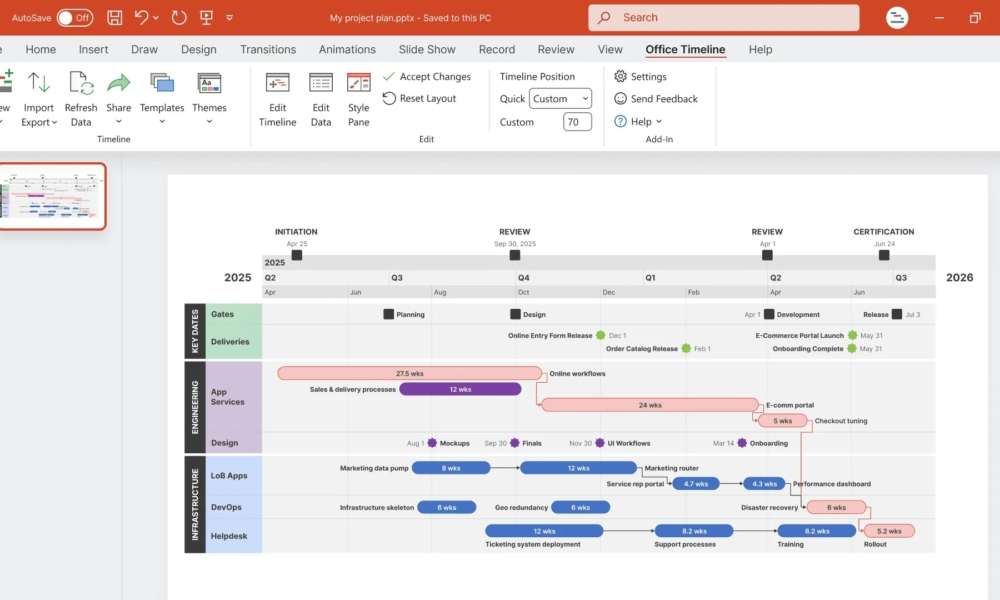

Creating clear and professional timelines is essential in today’s fast-paced business, academic, and project environments. If you’re looking for a powerful and easy-to-use timeline maker, one standout option in 2025 is the Office Timeline online tool. Whether you’re managing product launches, project milestones, or event schedules, this online solution simplifies timeline creation without sacrificing visual quality or flexibility.
What Is a Timeline Maker?
A Timeline maker is a digital tool that allows users to visually organize events, tasks, or milestones in chronological order. It helps present complex sequences in a digestible format. From Gantt-style project timelines to high-level executive roadmaps, a timeline maker enables users to break down information into a linear narrative that is easy to understand and act upon.
Traditionally, timelines were made in PowerPoint, Excel, or even manually. Today, advanced timeline makers like Office Timeline Online automate much of this work while delivering design-level results.
Why Timelines Matter in 2025
In the modern business landscape, visuals aren’t just about design—they’re about clarity and efficiency. Timelines are used across industries to:
- Communicate the project’s progress.
- Track key deliverables and deadlines
- Align cross-functional teams
- Report to stakeholders and executives
- Visualize strategy over time
With growing emphasis on agile planning and data transparency, timelines have become a non-negotiable part of effective communication.
Key Features to Look for in a Timeline Maker
When selecting a timeline maker, particularly in a professional context, specific features are crucial.
- Drag-and-Drop Interface
A good timeline maker should allow intuitive manipulation of milestones and tasks. Users should be able to adjust dates, durations, and positioning with ease.
- Professional Templates
Pre-built timeline templates save time and effort. Templates for project roadmaps, swimlane diagrams, Gantt charts, and executive summaries help match different presentation needs.
- Data Import Options
Advanced tools allow you to import data from Excel, Google Sheets, or project management platforms like Jira, MS Project, or Smartsheet.
- Export Flexibility
The ability to export your timeline to PowerPoint, PDF, PNG, or interactive web formats is essential for sharing and presentation.
- Custom Styling
Full control over colors, fonts, layout, and icons allows users to align timelines with brand standards or personal preferences.
How Office Timeline Online Excels
Office Timeline Online delivers all the features mentioned above in a sleek, browser-based platform. It was built with business professionals in mind but is accessible enough for educators and students as well. Here’s how it stands out:
– Browser-Based with No Install Required
All work is done online—no downloads or plugins needed. This makes it ideal for hybrid teams or remote users on different operating systems.
– Built for PowerPoint
Unlike many generic design tools, Office Timeline Online specializes in exporting timelines as editable PowerPoint slides. This is crucial for managers and consultants who present regularly.
Real-Time Editing and Live Collaboration
Premium users can collaborate in real-time, making it easier to align project updates and stakeholder feedback without version conflicts.
– Data Refresh
If your source data changes, you can update your timeline with one click—no manual edits required. This is especially helpful when managing evolving project timelines.
Use Cases for This Timeline Maker
Office Timeline Online is widely used in several industries:
- Project Management
Track phases, dependencies, and deliverables using a Gantt chart or project roadmap.
- Marketing Campaigns
Plan multi-channel launches across platforms with visual swimlanes.
- Product Development
Outline product lifecycle milestones, release dates, and feature rollouts.
- Education and training.
Create course schedules, historical timelines, or visual study guides.
- Consulting and reporting.
Create polished executive timelines for reports, pitches, or business proposals.
Pros and cons:
Pros:
- User-friendly interface
- Highly professional design output
- Excellent for PowerPoint users
- Ideal for quick visual reporting
- Great templates and styling control
Cons:
- The free version has limits (e.g., number of tasks).
- Some premium features require a paid plan.
- This is not a complete project management tool; its focus is on visualization rather than execution.
Timeline Maker vs. Manual Design Tools
Many still rely on Excel or PowerPoint alone to build timelines. While those can work, they’re not efficient or scalable. A dedicated timeline maker:
- Reduces design time by 70% or more
- Improves visual clarity and alignment
- Offers consistency across reports
- Prevents errors with built-in formatting
In short, it’s not just about aesthetics—it’s about precision and communication.
Content Creators Using Timeline Tools
If you’re blogging or creating content around timelines, here are some SEO-friendly tips:
- Use keyword phrases like “timeline maker online,” “how to make a timeline,” and “timeline software for PowerPoint.”
- Include actionable headers: “Steps to Create a Timeline,” “Best Timeline Maker Tools in 2025”
- Use list formats and bullet points for easy scanning
- Provide screenshots or visual examples where possible
- Write with a clear, user-intent-driven tone (tutorial, comparison, recommendation).
Final Thoughts
As the need for visual communication grows, tools like Office Timeline Online are changing the way professionals present and track information. This timeline maker delivers speed, precision, and polish—all without the steep learning curve of traditional design software. Whether you’re managing a team, launching a product, or teaching a class, this tool offers everything you need to create timelines that impress and inform.
In a world where clarity is key, having the right timeline maker can set your message apart—and Office Timeline Online is a smart choice to make that happen.